Independent sourcing partner for Network Equipment · factory quotations compared on the same radio, PoE class, uplink, and destination

BUYER CHECKLIST · CABINET RADIO

din rail wifi access point

This checklist is for a buyer who may put a din rail wifi access point on a 35 mm rail inside a cabinet. It is a requirement sheet, not a sustainability statement and not a stock list. LinkScope Sourcing 16 will not tick the boxes for you. Each open item should be copied into the inquiry so factories answer the same rail, power, and antenna questions.

  • Rail size and the free millimetres beside the radio
  • DC input or Power over Ethernet, not both assumed
  • Antenna port or internal antenna, with impedance if external
  • Evidence pinned to one model code
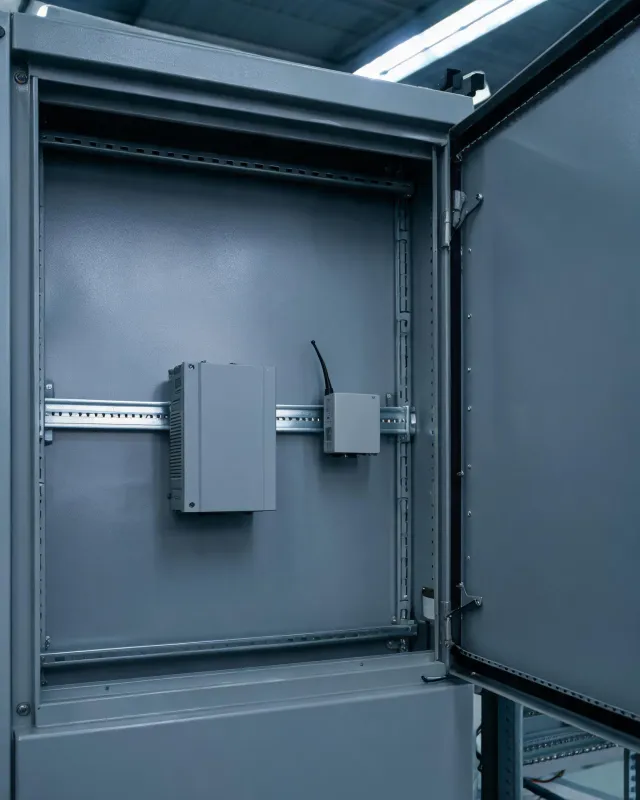
DIN rail radio inside an unlabeled control cabinet with a 24 V supply

Evidence to collect before an alternative is accepted

Rail

Confirm 35 mm EN 60715 style mounting and the module width. A wall-plate radio with a stick-on bracket is not a DIN module. Ask for the drawing that shows the clip.

Power

Many cabinet radios want 12 V or 24 V DC rather than Power over Ethernet. If the sheet says PoE, name the class and the watts at the device. If it says DC, name the voltage range and whether the supply is in the quote. Do not let a 24 V supply hide inside "radio included".

Radio

Frequency range, MIMO, channel width, and gain. A single-stream 20 MHz radio at 2.4 GHz can be the right tool for a machine SSID and the wrong tool for a dense office. Transmit power needs a test basis. An external RP-SMA port should state 50 ohm impedance and VSWR when printed.

Environment

Ingress protection of the module is often low because the cabinet is the enclosure. Ask which IP mark applies to the module alone. A cabinet that is IP66 does not transfer that mark to the radio. Temperature inside a closed box can sit above the aisle temperature. Ask for the operating range.

Control

Management method and license runtime. A cloud account for one cabinet radio can cost more over three years than the module. Unmanaged local setup can be enough when the SSID is static. Write the choice. New versus refurbished matters if the clip or the antenna connector was replaced.

Specification choices that often stay open: whether 5 GHz is required, whether an external antenna must leave the cabinet through a bulkhead, and whether the uplink is 100 Mbit/s or 1000 Mbit/s. Port speed still does not equal the Wi-Fi rate. Switching capacity does not belong on this module. Optical budget does not belong here unless someone has wrongly pasted a fiber line into the radio row.

On 2026-10-27 the FCC equipment-authorization index was the reference for where an FCC ID is checked after a supplier prints one. The IEEE 802 overview from the same day frames the Ethernet question for the cabinet jack. Neither source selects the module. Measurement accuracy of a handheld Wi-Fi app is not calibration traceability, and this checklist does not claim a lab method.

Checks before you accept a substitute module

Same rail, different power

A substitute that fits the 35 mm rail can still expect PoE while your cabinet has only 24 V DC. Reject the swap until the power row matches, or price a supply as its own line. Connector mating cycle is a poor reason to accept a worn antenna jack on a refurbished unit.

Same SSID name, different code

OEM-coded firmware and a compatible build can both broadcast an SSID you chose. That does not mean both join a controller you already run. Ask for the tested firmware. If you have no controller, say unmanaged and keep the license cell at none.

Antenna moved outside

An internal antenna inside a steel cabinet can be unusable even when the datasheet gain looks fine in open air. If the alternative moves the antenna outside, ask for the bulkhead, the jumper loss, and the ingress path through the cabinet wall. Insertion loss of that jumper is part of the link, not a footnote.

What the desk will mark, not decide

In a July 2026 practice sheet, a 24 V DIN radio and a PoE ceiling radio were offered against one cabinet line. The ceiling radio was set aside because the clip and the supply differed. No price ranking was made. The buyer still had to confirm whether a short external antenna was allowed on that machine. That confirmation is a site rule, not a sourcing result.

Related pages: inquiry card names, floor and uplink notes, and the form that receives this checklist.

Send the cabinet checklist

Copy the open items into the requirement field. Include rail width, DC or PoE, antenna plan, port speed, quantity, destination, and timing. A budget, if you add one, needs currency and a per-module or whole-order basis.

There is no upload control. The form posts the text you can already see. Factories are contacted after the desk reads it. A quotation is not waiting in a cart.

Please enter your name.
Please enter a valid work email.
Please enter your company.

Submitting lets the desk review the brief and contact factories. Read the Privacy Policy. Stock, price, compatibility, and compliance stay unconfirmed until a named supplier answers the exact model.